How to Digitize VHS Tapes at Home: Tape Checks, VCRs, Converters and Files
 Anjali Deshpande10 min read
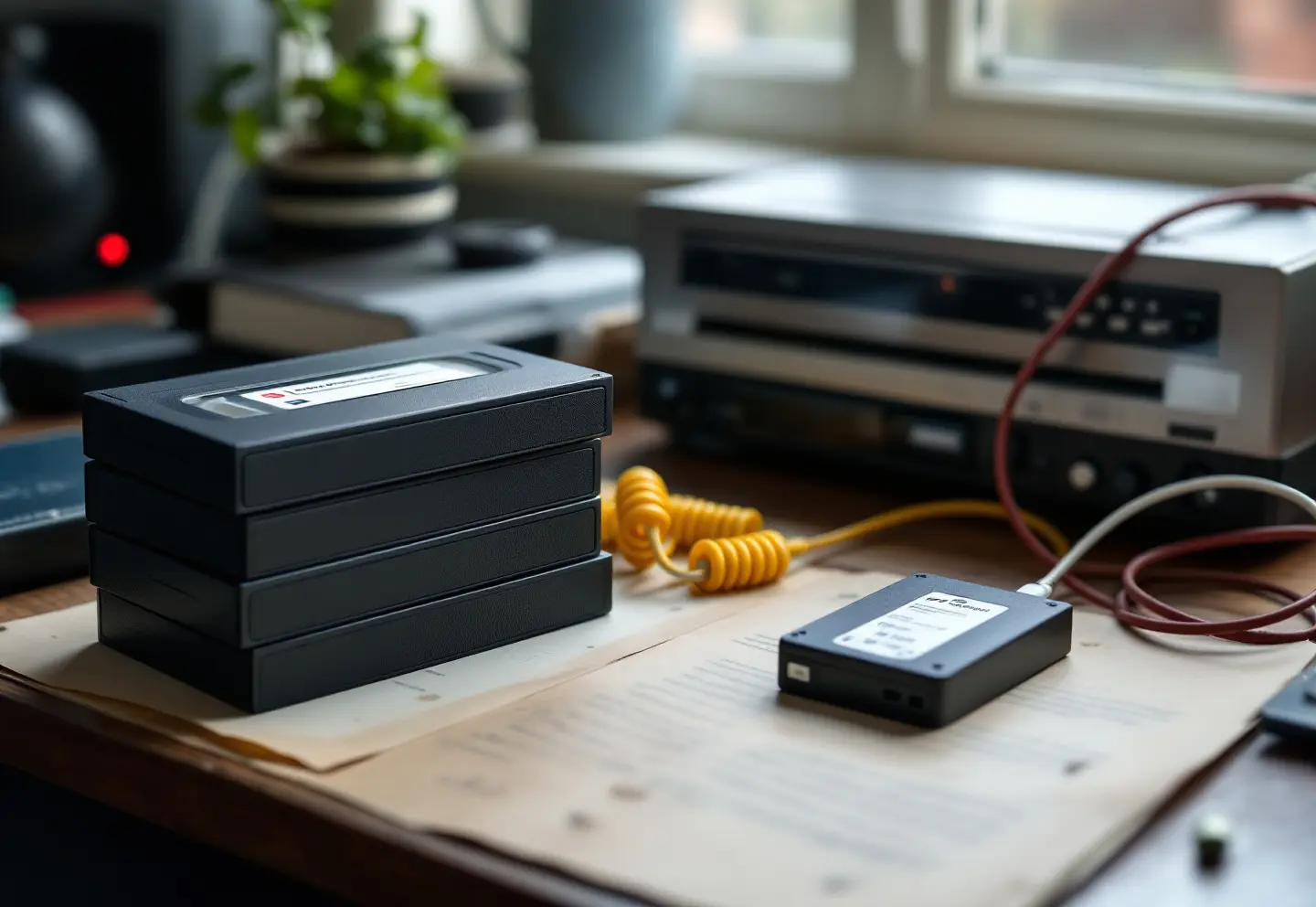
To digitize VHS tapes at home you need three things: a VCR that plays the tape cleanly, a converter that turns the analog signal into a file (either a USB capture device feeding a computer or a standalone recorder that writes to a memory card), and a drive to keep the results on. Capture runs in real time, so a two-hour tape takes two hours, plus setup and checking. Before any of that, look hard at the tapes. A moldy or damaged cassette can foul the VCR's heads and tear itself apart on the first play, and the tape is usually the only copy there is.
Archivist’s picks
- For: a shared archive
UGREEN NASync network storage
A network drive for home or office that keeps a full set of masters on your own shelf, reachable from every computer.
Open UGREEN
The short checklist
- A working VCR, tried first on a tape you do not care about
- Cables: composite video (yellow) and stereo audio (red and white), or S-Video if deck and converter both have it
- A USB capture device and a computer, or a standalone recorder
- An external drive, and a plan for a second copy
- A log for tape labels, dates and file names
- A flashlight and a box for tapes that fail inspection
Step 1: Inspect every tape before it goes in the deck
Press the release button on the side of the cassette to open the front flap, shine a flashlight on the tape, and look through the window at the edges of the wound pack.
| What you see | What it usually means | What to do |
|---|---|---|
| White or gray fuzz, spots or fine threads on the tape edges | Mold | Do not play it. Bag it separately and send it to a lab for cleaning |
| Edges of the pack stepped or sticking out, or a crease you can see | Uneven winding, a drop or a jam in the past | Retension gently (below); expect dropouts at the crease |
| Cracked shell, tape hanging slack outside the shell | Mechanical damage | Do not force it into a deck. A lab can rehouse the tape in a new shell |
| Squealing, sticky playback, the deck stopping on its own | The binder that holds the magnetic layer is breaking down | Stop at once, eject, clean the heads, and hand the tape to a lab |
| Tape stored in a hot attic, a car or a damp basement | Possible deformation or mold to come | Let it sit at room temperature for a day or two before playing |
Mold on tapes
Mold is the one problem that should stop you outright. It grows on tape stored damp, usually from the edges of the pack, and looks like white or gray dust, small spots or a faint web. Playing a moldy tape spreads spores through the tape path, clogs the video heads, and can make the tape stick to itself and shed. Seal any suspect cassette in a plastic bag, keep it away from clean tapes, and wear nitrile gloves to handle it; anyone with asthma or mold allergies should leave this to someone else. Specialist labs clean moldy tape on dedicated machines before playing it. If the tapes came out of a damp basement, the rest of what is stored down there needs attention too; see our guide to dehumidifiers for a basement records room.
Retension and protect
For tapes that pass inspection, fast-forward to the end and rewind fully before the first play, to even out the tension in a pack that has sat for decades (skip this for a fragile tape). Then check the small tab on the back edge: if it is still there, the deck can record over the tape, so snap it out.
Step 2: Get a VCR worth using
New VCRs are no longer made, so you are working with the family deck or a second-hand one. The deck matters more than the converter: dirty heads and worn parts give snow, rolling and dropouts that no software fixes later.
What to look for:
- Playback of the speed the tape was recorded at. Home tapes were often recorded at LP or EP (also called SLP) to fit six hours on a cassette. Most four-head decks play all three speeds; some basic two-head decks struggle with EP.
- Hi-Fi stereo audio, for tapes recorded with it.
- An S-Video output, mostly found on S-VHS decks. It keeps the brightness and color signals apart for a cleaner picture than composite.
- A built-in time base corrector (TBC), which steadies the timing of a wobbly signal from a stretched tape. Without one, many capture devices drop frames or lose the picture when the signal jitters.
- Clean heads. A cleaning cassette used now and then is fine; overuse wears the heads. A deck that has sat in a closet for ten years deserves a service before your only wedding tape goes in.
Camcorder tapes differ: VHS-C plays in a full-size VCR through an adapter cassette, while 8 mm, Hi8, Digital8 and MiniDV need the matching camcorder or a lab. Commercial movies on tape often carry copy protection that upsets capture devices, and copyright limits what you may copy; this guide is about home recordings.
Step 3: Choose a capture route
| Route | How it works | Good for | Limits |
|---|---|---|---|
| USB capture device and a computer | Converts the VCR's analog signal; capture software writes the file | Control over every setting, lossless masters, watching for dropped frames | Needs a computer; driver support varies by operating system; budget devices can drop frames |
| Standalone video-to-USB or SD recorder | Sits between the VCR and a memory card or USB stick, records MP4 directly | No computer, simple buttons, easy to lend to a relative | Fixed compressed output, no lossless master, small screen for checking |
| A transfer lab | They capture on professional decks | Mold, damage, odd formats, large batches | You hand over the tapes for a while |
What makes a good VHS to digital converter
Whichever route you take, the converter should:
- Accept S-Video as well as composite, plus stereo audio
- Capture standard definition at its native size (720 x 480 for US tapes) rather than upscaling to HD at capture
- Have current drivers for your computer (USB devices), or offer a bitrate setting and split long recordings into 4 GB files for FAT32 cards (standalone recorders)
- Let you see the picture while it records
Step 4: Capture settings
Capture the master as plainly as possible. Corrections belong in the copies you make from it.
| Setting | Use | Why |
|---|---|---|
| Video standard | NTSC for tapes recorded in the US | Tapes from Europe and much of the world are PAL and need a deck that plays them |
| Frame size | 720 x 480 | The native size of standard-definition video; upscaling adds nothing at capture |
| Frame rate and scan | 29.97 frames per second, interlaced | Keep the interlacing in the master; deinterlace only the access copy |
| Aspect ratio | 4:3 | Flag it in the file so players do not stretch the picture |
| Audio | 48 kHz, 16-bit or 24-bit, uncompressed PCM in the master | Compress the sound only in the access copy |
| Processing | Sharpening, denoising and color boosts off | They cannot be undone later |
| Cropping | None | Keep the full frame, including the ragged strip at the bottom; crop in the access copy |
Capture each tape in one pass, then trim later. Watch the dropped-frame counter if your software has one, and check sound against picture at the end of a long tape, where drift shows up. Photograph the label and sleeve first, and copy the handwriting into your log. A simple, consistent file name such as family-tape-07_1988-christmas.mkv beats whatever the software picks.
Step 5: File formats, access copies and masters
For most families an MP4 is the deliverable, and that is fine. Keep a lossless master as well when the footage cannot be shot again: weddings, the only video of a grandparent, a town parade, a recorded council meeting. A tape that plays today may not play in five years.
| File | Inside | Rough size per hour | Use |
|---|---|---|---|
| MP4 | H.264 video at about 5 Mbps, AAC audio | about 2 to 3 GB | Watching, sharing, phones, TVs, cloud albums |
| MKV | FFV1 lossless video, PCM audio | roughly 25 to 40 GB, depending on how noisy the picture is | Preservation master |
| MOV or AVI | Uncompressed 8-bit 4:2:2 video, PCM audio | about 75 GB | Master, when your tools cannot write FFV1 |
FFV1 in a Matroska (MKV) file is lossless, openly documented and used for video masters by a number of national and university archives. The free FFmpeg tools write it and can make a fresh MP4 from it whenever needed. Our article on file formats for long-term preservation explains why the master and the access copy should be different files.
Multiply those sizes by your hours of tape before you buy drives. Twenty hours kept as FFV1 masters plus MP4 copies runs to roughly 550 to 850 GB for one set, and you want at least two sets in two places. The storage planner in our scan resolution and storage calculator does that arithmetic if you enter each tape as an item and its size in megabytes.
When to use a lab
Home capture suits a few dozen tapes in fair shape. Send tapes out when:
- There is mold, a snapped or creased tape, or a cassette that squeals or sticks
- The format is one you cannot play: Betamax, U-matic, PAL tapes, camcorder formats without the camcorder
- The collection runs to hundreds of hours and your time is the real limit
- The footage has legal or historical weight and you want a documented, lossless transfer
Questions to ask a lab before you hand anything over:
- Do you use time base correction, and on what kind of decks?
- Will you deliver a lossless master as well as MP4 files, and on what media?
- Do the tapes stay in the US, or are they shipped elsewhere for processing?
- Can you clean moldy tape in-house, and do you charge separately for it?
- Do you capture the whole tape or only the parts with a picture?
- Are the originals returned, and how are the files named?
If the same cupboard holds data tapes or old discs, our field reference to legacy formats and media helps identify them, and its rule for an unlabeled box applies to video too: do not load anything until you know what it is.
After capture
Keep the tapes that played well, at least until every file is checked and the second copy made. Store them upright, fully wound to one end, cool and dry, away from speakers and magnets, with the file names written on the sleeves.
Workbench shortlist
- 1Open UGREEN
UGREEN NASync network storage
For: a shared archive
Run the numbers first: Scan resolution calculator.
Frequently asked questions
How long does it take to digitize a VHS tape?
Capture is real time. A T-120 cassette holds two hours at SP and six hours at EP, so a full tape at EP takes six hours to capture, plus inspection, trimming and making the MP4.
What is the best VHS to digital converter?
It depends on the route. A USB capture device gives you control and lossless masters if you have a computer; a standalone recorder is simpler and makes MP4 files only. In both cases, look for S-Video input, native 720 x 480 capture and good support for your system.
Can I digitize VHS tapes without a VCR?
No. The converter does not play tapes; it only records the signal. You need a VCR or a VCR and DVD combination unit that plays your tapes well.
What format should I save VHS captures in?
MP4 with H.264 video for watching and sharing. If the footage matters, keep a lossless master as well, such as FFV1 in an MKV file, and make new MP4s from it as needed.
Keep reading

Book Scanners: Overhead, Flatbed or Camera for Bound Books and Volumes
How to choose a book scanner for bound books and record volumes: overhead scanners with page flattening, when a flatbed is fine, camera setups, light and resolution.
Choosing a Document Scanner for Home and Office Records
How to choose a document scanner for home and office records: duplex feeders, portable and receipt scanners, OCR, PDF/A and the specs that change daily use.
What Is Microfiche? How to Read, Print and Scan It
What is microfiche, how does it differ from microfilm, and where can you still find a microfiche reader? A plain guide to reading, printing and scanning fiche.